
How it works
From market signal to published post — and a board that argues with you along the way.
One platform, two tracks: an outward loop that keeps you visible, and an inward advisory track that helps you decide. Here’s exactly how they fit together.
What does Adamiro actually do?
Adamiro is a modular agent platform for founders and small teams. Signals and Radar watch your buyers and your market; Voice drafts content in your voice; Reach schedules and publishes it; Mentor and The Tank give you structured advisory input on the decisions in between. One subscription, one shared task wallet.
A week with Adamiro
- Monday, morning briefing. Signals delivers a scored briefing of what moved in your market overnight, with content ideas ready to hand to Voice. Radar runs alongside it, watching your own competitive position.
- Pick a signal worth writing about. Click through from the briefing, or open Voice and browse your Ideas tab. Every idea from Signals, Radar, Mentor, or The Tank lands there, including your own.
- Draft it in Voice. Pick a format: LinkedIn post, blog article, newsletter, and many more to chose from. Voice writes a complete draft in your own voice, learned from your own writing, not a template.
- Schedule it in Reach. Send the draft to Reach, pick the platform and the slot, and it publishes on time whether you’re online or not.
- Ask Mentor when a decision needs a second opinion. A focused, up-to-30-minute session with an advisor that knows your business and remembers your discussions. No re-explaining your company every time.
- Bring the hard ones to The Tank. For a decision you keep postponing, a five-advisor board stress-tests your pitch and disagrees with you on purpose. Every session starts fresh, so yesterday’s consensus can’t bias today’s question. Just like pitching to a panel of investors.
The outward flow
from market signal to published post
This is the outward flow: how Adamiro turns something that happened in your market this morning into a post published in your voice, usually in under ten minutes of your time. Click through it step by step.
From market signal to published post
- Notice — Signals
- Write — Voice
- Publish — Reach
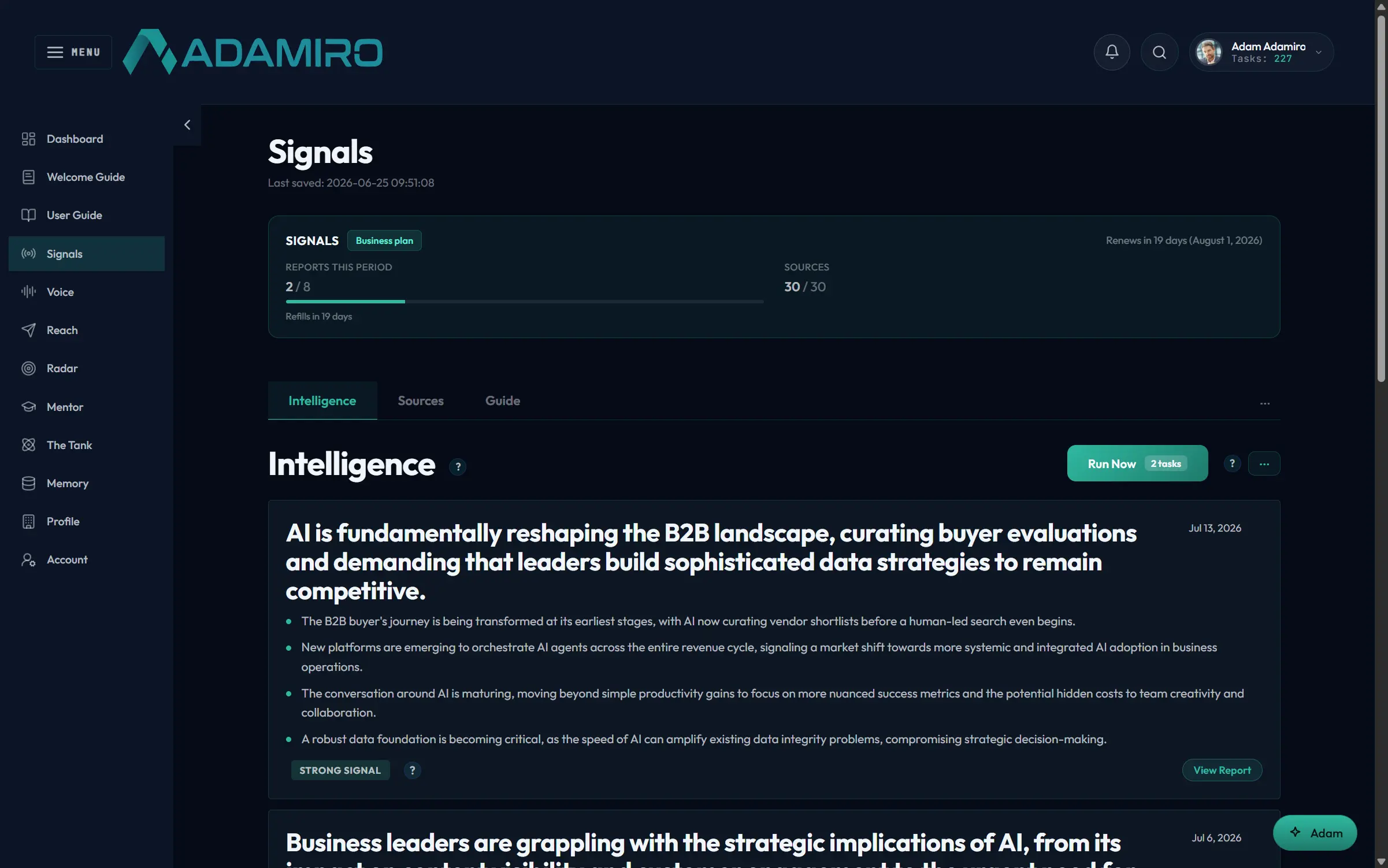
Signals reads your market overnight and delivers one briefing — you read it like the news.
No feeds, no tabs, no searching. Everything below happened while you slept, scored for relevance to your company.
Read the full demo, step by step
- The briefing lands — Signals reads your market overnight and delivers one briefing — you read it like the news. No feeds, no tabs, no searching. Everything below happened while you slept, scored for relevance to your company. (Behind the scenes — reads Profile: Relevance means relevant to you. Signals measures against the business profile you wrote once.)
- You spot the one that matters — Each signal explains why your buyer cares, with the source cited. You're not evaluating headlines. You're reading a reasoned case for why this item touches your market. Agree? That's a post waiting to happen.
- Signals suggests the angle — The briefing ends with content ideas: angles drawn from the signals above, phrased for your audience. This is the bridge between knowing and saying. Each idea names the buyer question it answers.
- One click into Voice — The idea arrives in Voice's Ideas tab, tagged with its source. Pick a format with “Write as…” Voice's inbox takes ideas from every direction: Signals, Radar, Mentor, The Tank, or your own head. This one came from the morning briefing.
- Voice sets up the draft — Pick a structure or let Voice choose; the task cost is shown before you commit. (Behind the scenes — reads Voice DNA: The draft is generated against your writing profile, learned from your own material, not a template's rhythm.)
- A draft that sounds like you — A complete, structured draft in about a minute. Edit inline; the preview shows how it reads on-platform. (Behind the scenes — writes Voice DNA: Flag any phrase you'd never say. Corrections train your voice profile, so drafts keep getting closer.)
- Hand it to publishing — Done editing? “Send to Reach” moves it to the queue.
- The queue takes over — Everything you plan to publish, one queue, clear statuses, and nothing ships without approval. Writing and shipping are separate jobs on purpose. The queue is where a teammate can review, approve, and slot the post.
- When, and as whom — Pick the time slot and the identity: your personal profile or the company page, per post. Reach publishes on schedule whether you're online or not.
- Shipped, with a paper trail — Scheduled posts go out on time and keep their history: what went out, where, when. That's the whole outward loop: market moved, you noticed, you said it in your voice, and it shipped. The next briefing is already brewing.
The inward flow
from market shift to a decision you trust
This is the inward flow: the same intelligence, pointed at your own decisions instead of your audience. Radar watches your market, Mentor reasons with you about it, and The Tank stress-tests the call before you commit.
From market shift to a decision you trust
- Watch — Radar
- Reason — Mentor
- Stress-test — The Tank
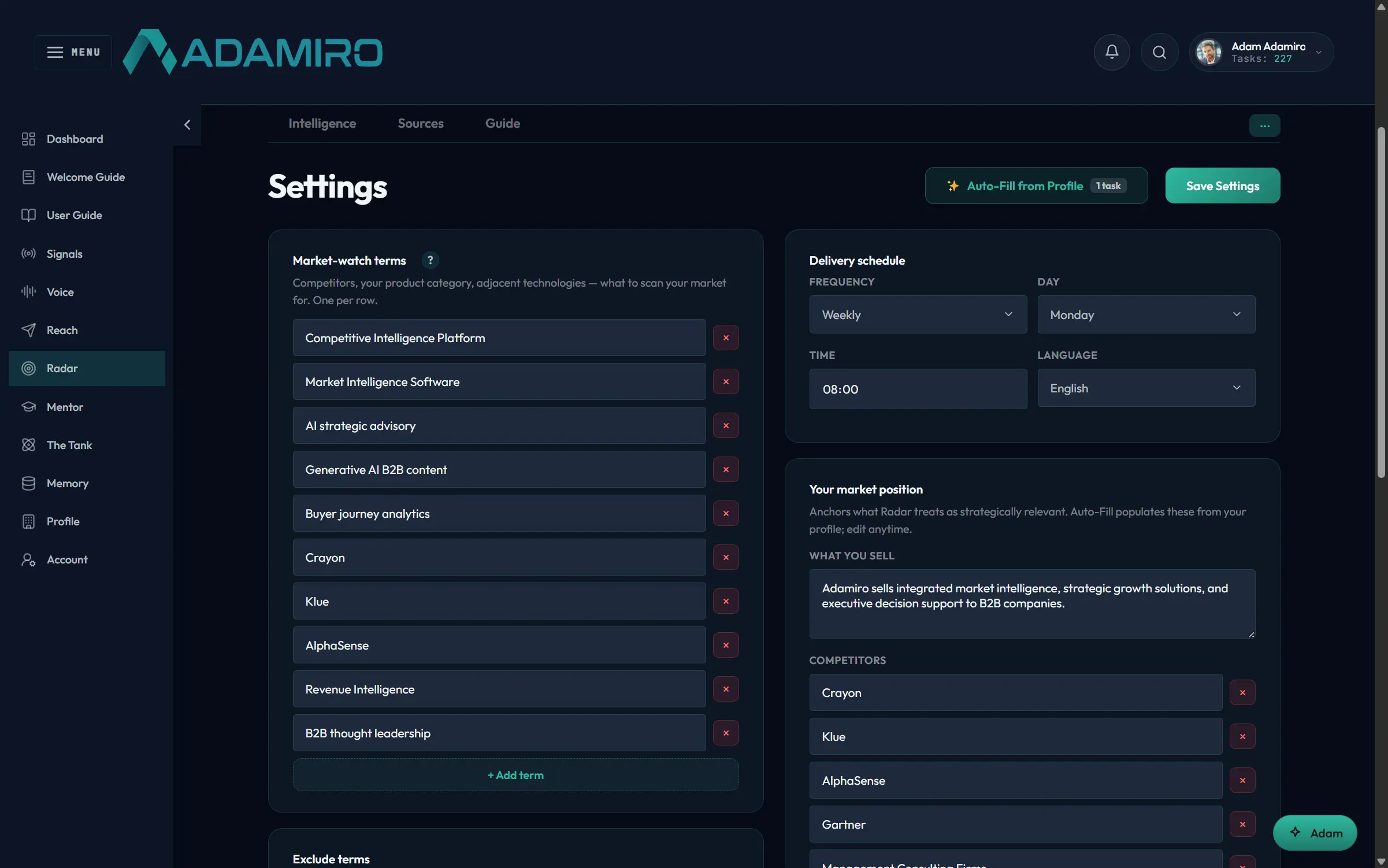
Competitors, category, technologies. Auto-Fill seeds it from your Profile; edit anything.
Read the full demo, step by step
- Tell Radar your market once — Competitors, category, technologies. Auto-Fill seeds it from your Profile; edit anything. (Behind the scenes — reads Profile: One click builds the watch-list from what Adamiro already knows about your business.)
- Briefings on what changed — Deep periodic reports: what competitors did, said, and shipped, and what it means for your position. (Behind the scenes — writes Radar ledger: Radar remembers what it already told you, so briefings carry only what's new.)
- Findings with consequences — Each finding names its likely effect on your offering: risk, opportunity, or pressure. This isn't a clippings service. The analysis is written against your position, which is what makes it usable in the next step.
- It ends with moves — Every briefing closes with prioritized recommendations, confidence levels, and a watch list. Recommendations with time horizons — this month, this quarter — and confidence levels. This is the raw material for a real decision, which is exactly where Mentor comes in.
- Take the decision to Mentor — Ask like you'd ask a board member. Sending starts a focused 30-minute session. (Behind the scenes — reads the memory: Mentor also arrives knowing your business from every earlier session. No re-explaining.)
- An argued position — Mentor takes a position and shows its reasoning, citing your own Radar findings where they bear on the question. Watch for it in the answer: “your Radar briefings show…”. The advisor and the watchtower are connected.
- Push back, it pushes back — Disagree and Mentor argues its case or updates it, and tells you which. (Behind the scenes — writes the memory: When the session ends, what was discussed is saved. Next session starts where this one stopped. Read and delete any of it on Mentor's Memories tab.)
- Now stress-test the call — Before you commit, put the decision in front of a board built to disagree with you. (Behind the scenes — reads Pitch File: The board's only context is your one-page Pitch File. Deliberately nothing else.)
- Five mandates collide — Five advisors — lead, support, challenge, reframe, question — take your decision apart in front of you. The disagreement is the point. You see the strongest case on each side, not a blended average that offends no one.
- You decide, and the board forgets — The session ends with the best argument for each path. You decide. Next time, the board sits fresh. That's the inward flow: watch, reason, stress-test, decide. Then, if the decision is worth announcing, the outward flow is one click away. (Behind the scenes — saves nothing: Deliberations are never saved; yesterday's consensus can't bias tomorrow's question. Mentor remembers so you get continuity; The Tank forgets so you get honesty.)
How Adamiro knows you
and what it remembers
Adamiro keeps five kinds of knowledge about you: your Profile (who your business is), your Brand kit (how it looks), Your Voice (how you write), the memory (what you and Mentor have discussed and decided), and per-product preferences learned from your feedback. Each product reads only what it needs, and you can see and delete what’s stored.
Your Profile
Written once, at Profile. Who you are, what you sell, which market you sell it in.
Signals scores relevance against it, Radar’s Auto-Fill builds a watch list from it, and Voice never has to ask who you are.
Your Brand kit
Colors, logo, and font, set on the Profile’s Brand tab.
Every visual Reach composes — carousels, infographics — uses it. Change it once, everything that ships next follows.
Your Voice
Learned from your own writing in Voice’s “Your Voice” tab, and from the phrases you flag while editing.
It’s personal: colleagues on your account each have their own. Drafts come out in your rhythm, not a house style’s.
The memory
What you and Mentor have discussed: decisions, context, open threads. Saved when a session ends, loaded when the next one starts.
It’s readable on Mentor’s own Memories tab, and deletable, entirely or one entry at a time.
Learning from your feedback
Every Relevant / Not relevant and Useful / Not useful vote tunes the product you cast it in.
The loops are separate on purpose: teaching Signals your taste never changes what Radar shows you.
Who reads what
| Product | Reads | Writes | Deliberately never |
|---|---|---|---|
| Signals | Profile | Signals preferences (your ratings) | Your Mentor sessions |
| Radar | Profile (Auto-Fill) | Radar preferences · its own “already told you” ledger | Signals’ preferences |
| Voice | Profile · Your Voice | Your Voice (your flags and edits) | Colleagues’ Voice |
| Reach | Brand kit · connected accounts | Publish history | — |
| Mentor | The memory · your Radar intelligence | The memory (session summaries) | — |
| The Tank | Pitch File only | Pitch File versions | Board deliberations — every session starts memoryless, by design |
One deliberate contrast worth knowing: Mentor remembers so you get continuity; The Tank forgets so you get honesty. A board that remembered losing last month’s argument would stop arguing. For where this data lives and how it’s protected, see Data protection.
Can I see what Adamiro remembers about me?
Yes. Mentor’s Memories tab lists what’s stored from your sessions, and your Profile, Brand kit, and Voice samples are all directly editable. Nothing is hidden in a place you can’t look.
Can I delete it?
Yes — the memory can be cleared from Mentor’s Memories tab, and your account data can be deleted entirely. Deleting the memory means Mentor starts from scratch, like a new advisor.
Do my colleagues share My Voice?
No. Your Voice is per-person. Colleagues on a Business plan share owner-governed company settings, but how each person writes stays their own.
Does The Tank remember my sessions?
No, and that’s a feature. The board reads your Pitch File — a short business brief you keep current — but its deliberations are never saved. Every session gets a fresh, unbiased board.
Adamiro vs. doing this manually
| Doing it yourself | With Adamiro | |
|---|---|---|
| Market monitoring | Hours/week reading feeds, competitor sites, news alerts | One scored briefing, delivered |
| Writing in your voice | You write it, or a generic AI tool writes it generically | Voice learns your writing, drafts in your rhythm, with your words and phrases |
| Strategic sounding board | An advisory board (if you have one) or nobody | Mentor and The Tank, on demand |
| Tools replaced | A content calendar tool, a social scheduler, a news-monitoring tool, and an advisor’s retainer | One subscription |
The six products
OUTward market intelligence
Signals
A scored morning briefing of what’s happening in your buyers’ world.
Voice
Drafts content in your own voice — LinkedIn, blog, newsletter, and more.
Reach
Schedules and publishes across LinkedIn, Instagram, and Substack.
INward market intelligence
Questions people actually ask
Do I need all six products?
No. Plans bundle different combinations — Starter is Voice-focused, Growth adds Radar and Reach, Business and Team add Mentor, The Tank, and multi-seat collaboration. See the pricing page for what’s in each plan.
How long does the whole loop take, start to finish?
Most customers go from a Signals briefing to a published post in under 15 minutes of actual attention — the drafting itself takes Voice under a minute; the rest is your review, adding or generating images, and scheduling.
What’s the difference between Mentor and The Tank?
Mentor is one advisor with persistent memory of your business — good for an ongoing sounding board. The Tank is a five-advisor board, memoryless by design, built for a single high-stakes decision you want stress-tested from multiple angles.
Can I use Adamiro without publishing on social media?
Yes. Voice and Mentor both work as standalone tools — drafting for channels Reach doesn’t cover, or using Mentor purely as an advisor. Reach is where the workflow becomes end-to-end, but nothing forces you into it.
Last reviewed: July 2026