
Campaigns
A run of posts, planned together.
Pick what to write from, how many posts and a schedule, and Adamiro proposes the topics from what it already knows about you. You see the exact task cost, and approve every post, before anything goes out.
Free to plan
A whole run of posts, whatever the count. Each post is priced like a Voice draft
Voice writes
Every post is separately generated by voice. Including images if you want.
Reach publishes it
Scheduling and publishing cost nothing, once you approve
The problem
One post at a time is not a plan.
Writing a single post is easy. Deciding what the next six should say, in what order, and when each one should go out, is a different job. Most weeks that second job does not get done, so posting stops the moment the person doing it gets busy.
A campaign is Adamiro doing that second job. It reads what you already have (your Memory, your Signals briefings, your own best-performing posts, or pages you point it at), proposes a run of topics from it, and puts each one on a schedule before you write a word.
How it’s planned
Set the shape. Adamiro proposes the topics.
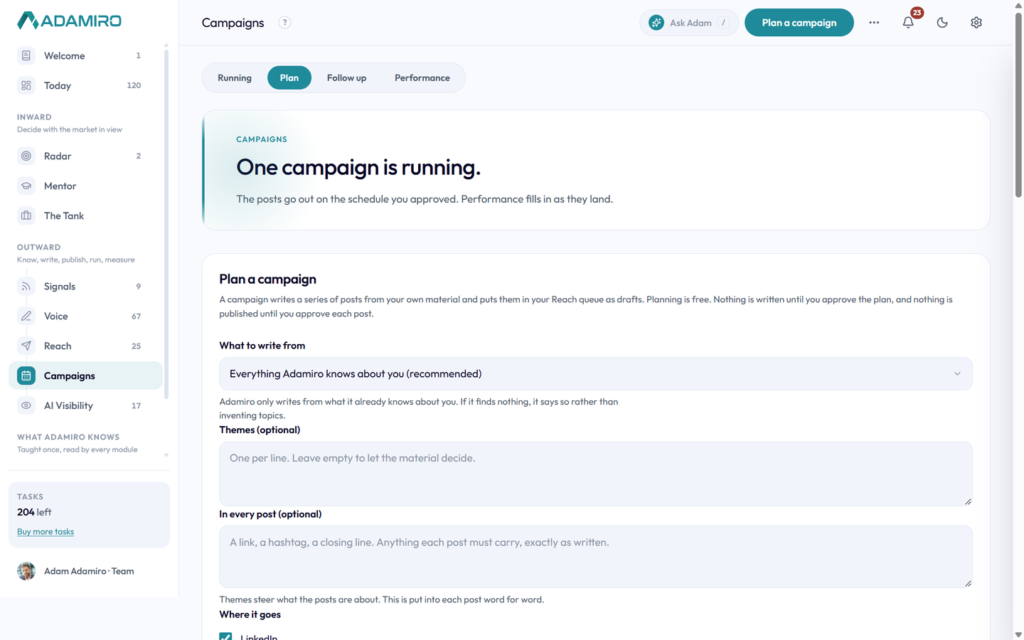
Open Plan and choose what to write from: Memory, Signals, your website, what your own posts have actually done, your AI Visibility results, a narrower combination, pages you point it at, or themes you type yourself. Choose whether posts go out under your personal or company voice, how many (up to 12), and where they go, LinkedIn, Instagram and your own WordPress site are all included on every seat.
Pick what kinds of post you want. Nine kinds, Insight, Case study, Opinion, How-to, Framework, Lesson, Contrarian, Resource and Offer, each written differently, and a mix that tells you what that works out to in whole posts as you type. Then set when they go out: a weekly pattern of day-and-time rows the posts fill in order, or let Adamiro fill the whole pattern with the times it recommends for each day and your audience’s region.
Press Preview plan and Adamiro proposes a list of topics based on your material, each one showing which of it was used, with citations, so you can check it before anything is written. Untick any you do not want. This step is free. Confirm, and it shows the exact task cost for the whole batch against your balance, before anything is created.
How it runs
Every post waits for you.
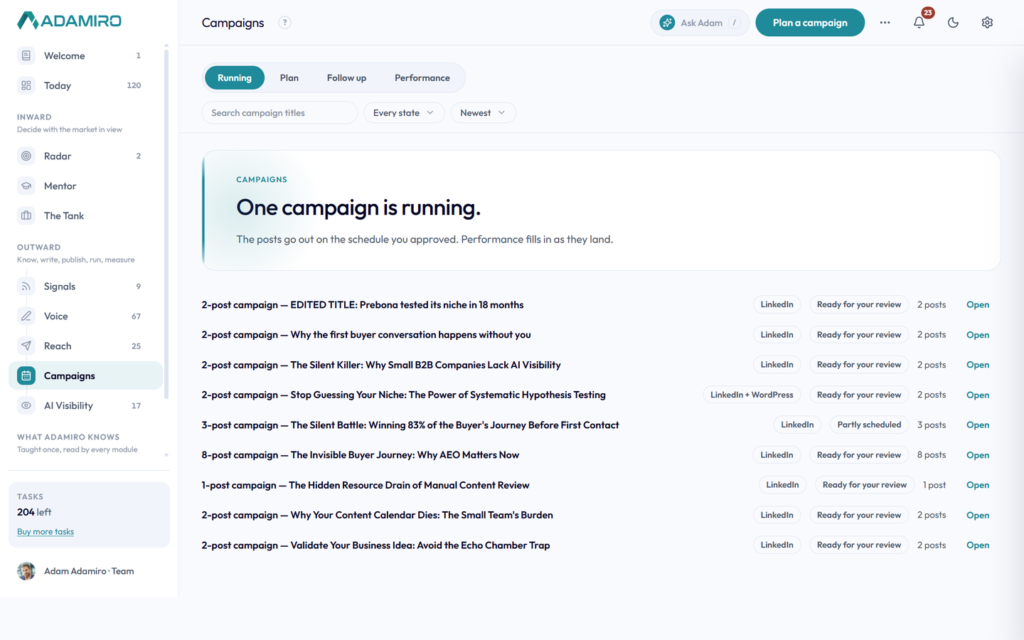
The posts land as drafts, tagged to the campaign, in the same Reach queue every other post you write uses. Nothing publishes on its own. Running lists every campaign you have running or have run, with the dates its posts go out, where they go and its state. A campaign follows its posts in Reach, so once every one has been published it reads Completed. Duplicate copies a finished campaign’s posts into a new one as drafts with no times, and costs nothing.
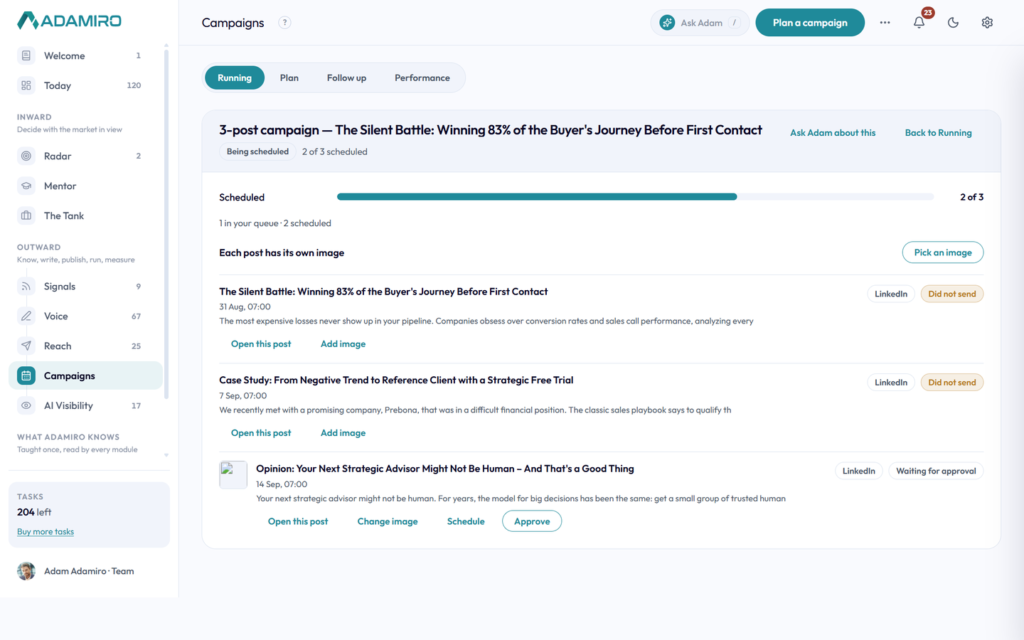
Open takes you to that campaign’s own review page: one row per post, its picture on the left, then its title, scheduled date and a preview of the text, its platform and status on the right. Each post has its own Change image button, so one post can carry a different picture than the rest. Approve does two things at once: it approves the post and schedules it at the time the plan set, so there is no separate step to put it on the calendar.
Performance
What your posts actually did.
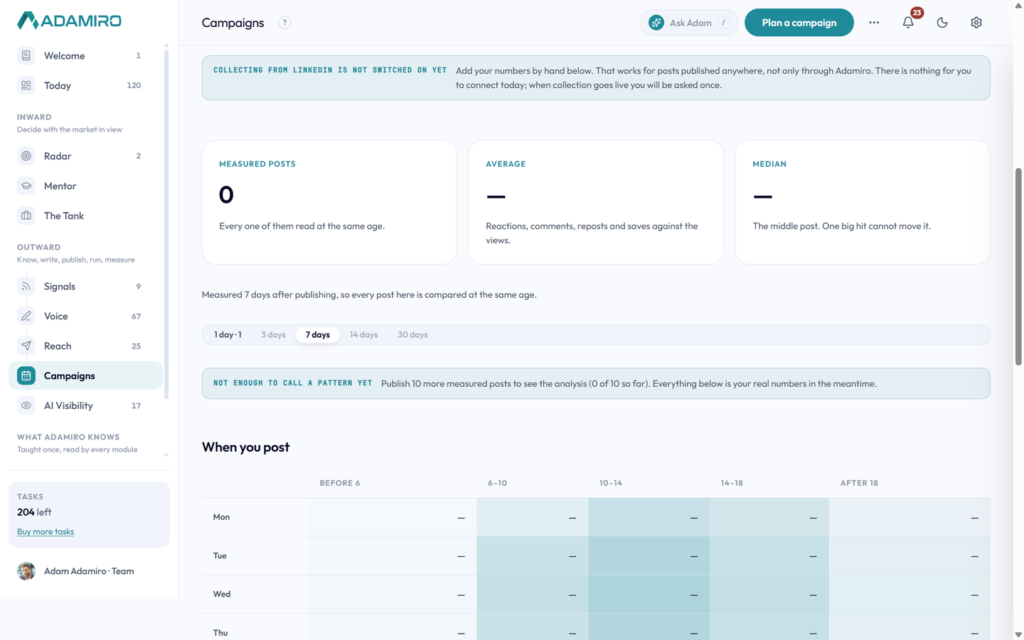
A fourth tab, on every seat, shows how many posts have been measured, your average and median engagement, a breakdown by kind of post, and your best posts. A number nobody has is shown as a dash, never as zero, because “I don’t know” and “it was zero” are different facts. Connect post analytics and LinkedIn fills the numbers in on its own, or add them by hand for a post published anywhere.
A grid of the week against five parts of the day shows the average views your own posts got there, ranked by views rather than engagement rate, because when you post mostly changes how many people see it. Analyze my posts needs at least ten measured posts and tells you the task cost before you press it; below ten it still shows you the raw figures instead of an empty panel.
What it costs
Planning is free. Voice’s price per post.
Every seat gets Campaigns. The plan is free, then each post is priced like a Voice draft: 1 task for a short post, 2 for a long one. Scheduling and publishing through Reach are free.
Preview plan and the recommended day and time are always there. The part that learns from your own posts needs at least ten measured posts, not a plan upgrade. Until then you get the recommendation built from LinkedIn’s own averages instead of an empty panel.
Common questions
Common questions about Campaigns.
What is a campaign?
A run of posts planned together instead of written one at a time. You pick what to write from, how many posts, which platforms and a schedule, and Adamiro proposes the topics from your own material with citations, so you can check them before anything is written.
What does a campaign cost?
Planning is free, whatever the post count. Each post is then priced the same as a Voice draft: 1 task for a short post, 2 for a long one. Scheduling and publishing through Reach cost nothing.
Does a campaign publish itself?
No. Every post lands as a draft in your Reach queue, tagged to the campaign. You open each one, change its image if you want to, and press Approve, which approves the post and schedules it at the time the plan set in one step.
Can I start a campaign from something I already wrote?
Yes. Every idea card in Voice has a Campaign button beside Write as, and every draft’s menu has one too. Planning from a draft reads its full text as the campaign’s background material. A long draft also offers Posts from this piece, three posts cut from different parts of it.
Can I see how my campaign posts performed?
Yes, on the Performance tab, on every seat. It shows how many posts have been measured, your average and median engagement, a breakdown by kind of post, and your best posts, with LinkedIn filling the numbers in automatically once you connect post analytics.
Can it collect replies and follow up automatically?
Partly. Follow up collects the replies a campaign got on LinkedIn Company Page posts and groups them by campaign, so what came back is in one place. Answering happens on LinkedIn, one click from the row: Adamiro does not write replies for you. A post published from a personal profile cannot be read, because LinkedIn only opens a comment thread to the Company Page that owns it.
Plan your first run.
Fifteen trial tasks, no clock, no card. Open Plan, point it at what you have already written, and see the topics it proposes before you spend anything.