
For agencies
A separate workspace for every client.
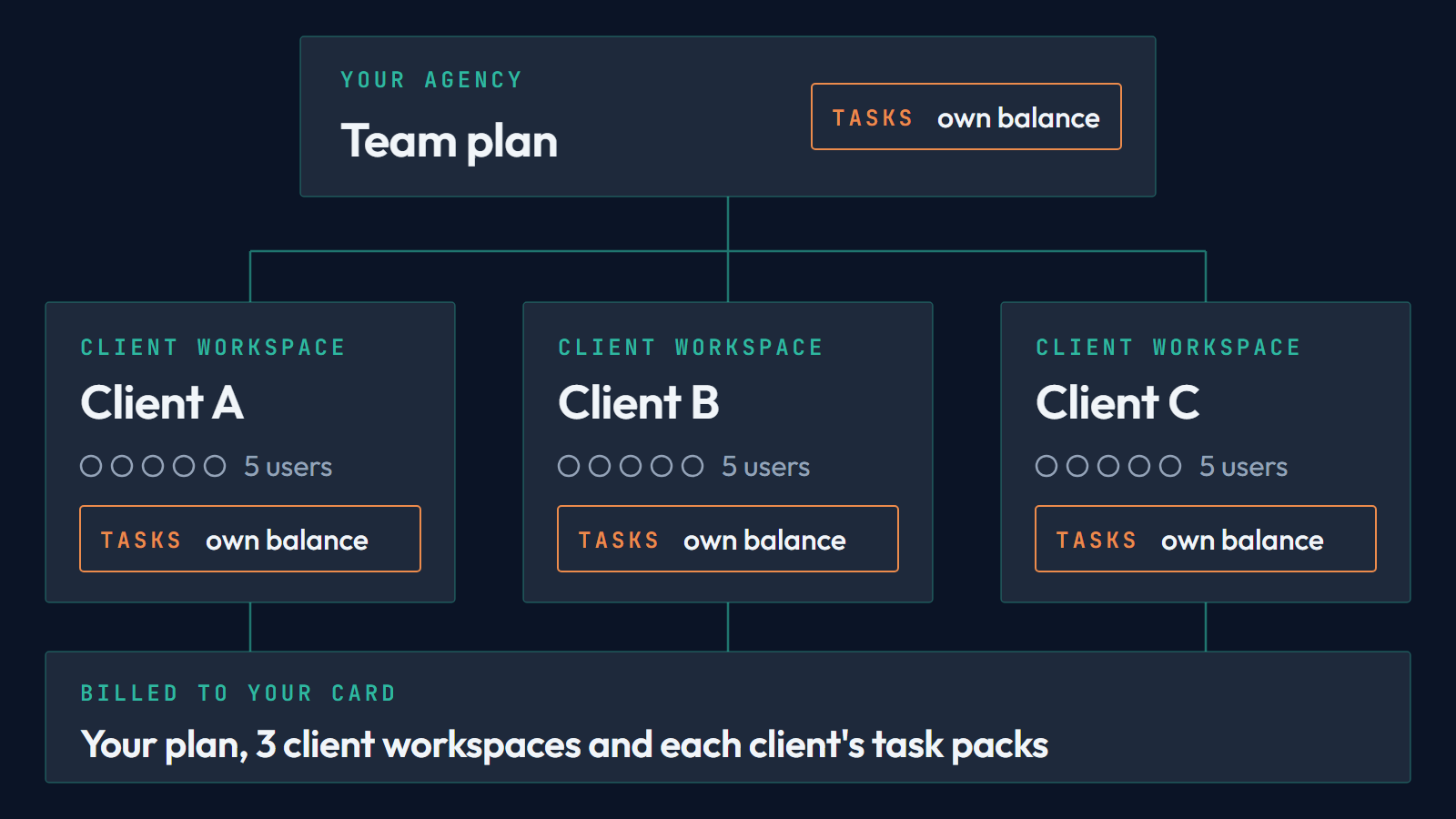
Agency is the Team plan with a workspace added for each client. Each one has its own company profile, Brand, Memory, drafts and tasks. Nothing crosses between clients, or between a client and your own account.
$49 a month per client
Your own plan is Team, at $99 a month. Each client workspace is one more line on the same subscription. On yearly billing a workspace costs ten months for the year. Prices exclude VAT.
A full workspace, kept apart
Every client gets a Team workspace that you own: five users, every module, and its own company profile, Brand, Memory, drafts and connected accounts. Nothing in it is shared with your account or with another client.
One invoice for everything
Your plan, the client workspaces and the task packs you buy for each client are charged to your card. A usage report shows the tasks each client used, by module and month. It never shows what anybody wrote.
How it starts
1. Choose Agency
Press Start as an agency and create your account. Choose how many client workspaces to start with, from none to ten, and pay once for the plan and the workspaces. To try Adamiro first, take the 15 free tasks on the same page. You then choose your client workspaces when you start the paid Team plan, and nothing is charged for a client before that.
2. Add a client
The workspaces you chose at checkout are ready when your payment goes through, named Client 1, Client 2 and so on. Rename them, and add the next one with New client workspace. Its line joins your subscription, and today you pay only for what is left of the current billing period. A new workspace starts with no tasks, so buy its first pack next.
3. Put your people in
Switch on the Co-Editors who should work for that client. They work there as agency staff, see only the clients you put them in, and do not use any of the client’s five seats.
4. Hand over or archive
A client who wants to run Adamiro themselves takes the workspace over, with everything in it and the tasks it has left, and pays for it from then on. If the work ends, archive the workspace: its line leaves your next invoice, and when it closes the tasks it has left move to your own balance.
An agency with three clients pays $99 + 3 × $49 = $246 a month. With ten clients it is $99 + 10 × $49 = $589 a month. Task packs come on top, bought inside a client’s workspace when that client needs them. These are examples, before VAT.
What the client gets
A client workspace has five users, so the client’s own people can work in it as Co-Editors. They see the workspace’s task ledger, with who spent what. They never see your other clients. They cannot buy tasks, and the workspace tells them that you add those.
Tasks per client
Each client workspace holds its own tasks and starts with none. You buy a pack inside the workspace, it is charged to your card, and it can only be spent there. The invoice carries the client’s name. Auto top-up is off until you turn it on for a workspace. Staff you assigned can add tasks too, and you get an email each time they do.
Your people
The people who work for your clients are the Co-Editors of your own account. Assign each of them to the clients they work for. They see only those clients and use none of the client’s five seats. When someone leaves your agency they lose access to your clients, and what they made stays in the workspace.
When a client takes over, or the work ends
Hand the workspace over when the client wants to run it themselves. The client gets a link, picks a plan and pays on the normal checkout, and you keep access until that payment goes through. The workspace is then theirs with everything in it: company profile, Brand, Memory, sources, drafts and the tasks it has left. If the work ends instead, archive the workspace. It turns read-only, its line leaves your next invoice, and you can restore it within 7 days. After that it closes, and the tasks it has left move to your own balance.
A client who already has Adamiro
Ask for access from your Agency page. The client approves it, chooses the account your people work in, and can end the access at any time. There is no workspace fee, and the work spends the client’s tasks. The client can set a task cap for each of your people.
HOW IT’S CHECKED
Nothing goes out on trust.
A finding in a briefing says how many of the items read back it: “4 of the 12”, “3 of 3 job ads”. Never “probably”. A source that speaks for a whole industry counts as one voice.
A claim in a draft is tested against its opposite while it’s written. If no company would claim the opposite, the claim says nothing, and it’s replaced with the specific thing you do or cut.
A quote is checked against the page it came from. If it isn’t there, it is marked as a fact to verify, and nothing is published until you settle it.
A number is yours, or it is marked. Voice invents nothing unless you tell it to, and it marks what it invented. A case study starts with a fact interview so it contains what only you know.
A post is approved by a named person before it goes out: you, or an operator working inside the rules you wrote. There is no other path to publish.
Common questions
Everything you need to know
Can the client see what we spent?
They see the task ledger for their workspace, including who spent what. They don’t see your other clients.
Can we use our own Memory for a client?
No. Each workspace has its own, and nothing crosses between them.
Do our client workspaces get a welcome bundle?
No. The welcome bundle comes once, with your own first payment, and goes to your own account. A client workspace starts with no tasks.
Start with one client.
Add the next workspace the day you need it. There is no upper limit.
Built in Sweden. Stored in the EU. Nothing you give Adamiro trains a model.